 XP TRACKER
Custom printable habit tracker maker
Type the habits you want to track, choose the month, and this tool draws a grid with the right number of days and the weekdays in place. Print it in landscape, stick it somewhere you'll see it, and tick a box each day you do the habit.

Make your habit tracker
How to use your tracker
- Keep it where the habit happens. A water habit belongs on the fridge, a reading habit next to the bed, a stretching habit by the yoga mat. A sheet in a drawer gets forgotten by day four.
- Tick it right after you do it. The tick is part of the habit. Waiting until the evening means guessing.
- Mark rest days on purpose. Circle a box for a planned day off. A circle is a decision; an empty box is a miss.
- Count at the end of the week. Write the running total in the last column every Sunday. Seeing 5 out of 7 is more useful than staring at the two gaps.
The goal column is for a target you choose, such as 20 out of 30 days. Most people don't need every single day, and a target below 100% leaves room for real life.

Choosing what goes on the sheet
Write each habit as an action you can tick without thinking about it. "Read 10 pages" works. "Read more" doesn't, because on any given evening you can't tell whether you did it. Add a number or a time where you can: 10 pages, 20 minutes, one glass.
Start with three to five habits. Picking more than that in month one is the most common reason paper trackers get abandoned, and our guide on how many habits to build at once explains why. If you aren't sure what to track, the list of habits worth tracking has ideas sorted by how much time they take.
This tool or the ready-made sheet?
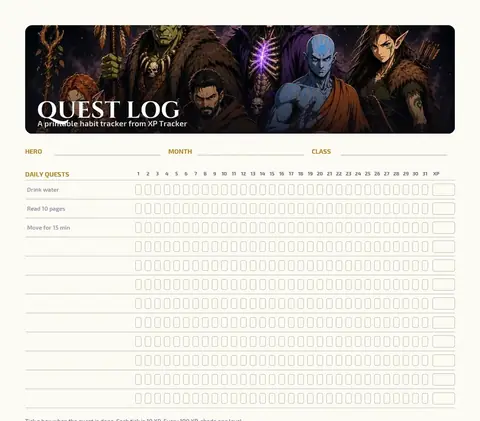
This page prints a plain grid with your own habits and the right month. If you'd like a designed sheet with XP, levels and a boss to wear down, download the printable Quest Log instead and write your habits in by hand. If you'd rather tick boxes on a computer, the spreadsheet version counts your totals for you.
Limits
A paper grid can't remind you, and it can't tell you that you've skipped reading three Thursdays in a row unless you look. Once a month, read the sheet like a report: which habit has the most gaps, and which day of the week is weakest? Then make that habit smaller or move it to a better time. The guide to tracking habits on paper covers that review in more detail.
Start today
Type three habits, print the sheet and tick today's box for anything you've already done. Starting on a random Tuesday is fine; the first row doesn't have to begin on the 1st.
Questions people ask
How do I make my own habit tracker?
Write the habits down one per line, pick the month, and print a grid with one row per habit and one column per day. This tool does the layout for you, including the number of days, the weekday letters and the totals column. A ruler and a pen work too; it just takes longer.
How many habits should I put on a habit tracker?
Three to five for your first month. A full sheet of fifteen habits looks motivating on day one and turns into a wall of empty boxes by week two. Add one habit once the first ones feel easy.
What paper size should I print it on?
A4 or US Letter, in landscape. The grid scales to the page width, so both sizes fit a 31-day month. Choose landscape in your browser's print dialog if it doesn't switch by itself.
Is there a ready-made version?
Yes. If you want a designed sheet with XP, levels and a boss bar instead of a plain grid, download the printable Quest Log. This page is for when you want your own habits and month printed in.
Can I track habits on my computer instead?
Download a spreadsheet version from the habit tracker spreadsheet tool. It opens in Google Sheets, Excel or Numbers and counts your ticks for you.
Related pages




Start your journey
Pick a class, do the day's quests, and watch your hero level up with you.
Start free on iPhone and Android.
Scan to install Point your phone camera at the code. iPhone opens the App Store, Android opens Google Play.